Tap Connect Wix, approve once in Wix, and each article lands in your Wix blog as a draft.
The short version. Switch to Full article for every detail.
Tap Connect Wix and approve our app once, on Wix's own screen. Each article then lands in your Wix blog as a draft, so nothing goes live until you say so. On the All Eight plan, our team also publishes for you.
The plain version, no background needed. Switch to Full article for every detail.
Connecting your Wix site takes about a minute: you add our app on Wix's own screen, and you're done.
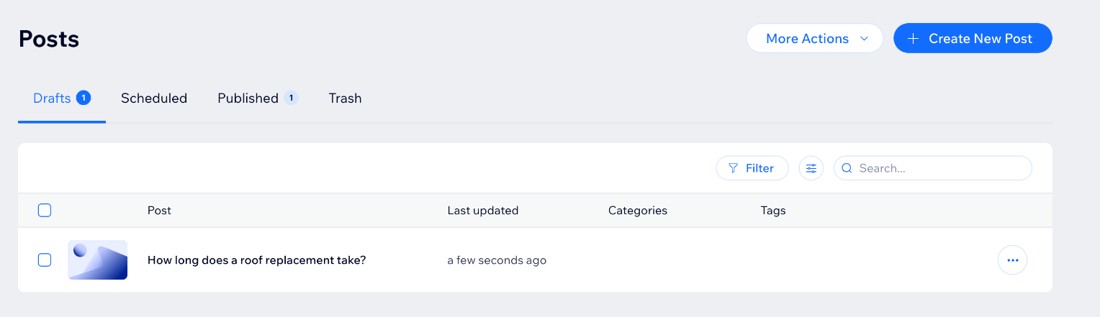
Every article then arrives in your Wix blog as a draft. Nothing goes live until you say so.
The steps, one at a time
- When we ask "What's your website address?", type your address. We tell you it runs on Wix. Tap Connect Wix.
- Wix opens its own page for our app. Sign in to Wix if it asks, pick your site, and tap Add to Site.
- Wix shows what our app can do on your site: work with your blog, and read your site's basic details. Tap Agree & Add.
- Wix sends you back to us, and your site shows as connected. That's it.
Where your articles land
Each article lands in your Wix dashboard under Blog, then Posts, then Drafts. Open it, look it over, and publish it when you're happy.
On the All Eight plan, our team also publishes for you.
Who can add the app
On Wix, the site owner or an Admin (Co-Owner) can add apps. If that's not you, share this page with the person who owns your Wix site.
If something doesn't look right
- Wix says you can't add apps? Your Wix login isn't the owner or a co-owner. Ask the site owner to add it.
- Your blog is empty? Wix needs one post on your blog before an app can add drafts. Write a short first post in Wix (it can be a simple hello), then we take it from there.
- Anything else, tell us in the app. We're here, and we'll sort it out with you.
You're in: what happens next
Head to Install your content to see how your first pieces get onto your site.
Was this page helpful?