Get your signing tool named by ChatGPT and Google AI when buyers ask which one to pick.
In 18 AI answers about e-signature software, 17 put a price or a free plan on the tools they named, and the vendors' own pages were the sources. See the answers
Freelancers, property managers and small businesses ask AI which e-signature tool fits and what it costs, and it names a short list with prices. RunOctopus writes and publishes the pages those answers draw from, then shows you each month who the AI named.
Run my free scanThe names ChatGPT and Google AI gave, in order. One run, one day. Both named Dropbox Sign and airSlate SignNow.
A freelancer used to compare signing tools in five tabs. Now many type one sentence: "what is the best e-signature software for a freelancer who sends a few contracts a month and wants a free plan?" The AI does not show ten results. It names a short list and prints a price and the free plan cap for each.
If you are on that list, the buyer starts a trial. If you are not, they never hear about you. And the list is not only the biggest names: in our check SignWell, BoldSign, DocuSeal and Zoho Sign were named beside DocuSign and Dropbox Sign.
Buyers get a short list, a price and the free plan cap. A clear page gets a smaller tool onto it.
Each answer named a handful of tools. The first few get the trial.
17 of 18 answers put a price or a free plan on the tools they named. A tool with no clear price page gets guessed at.
Buyers ask what five people will cost with bulk send. The AI does that sum from your per-user price and your plan limits, so they have to be printed plainly.
Is DocuSign or SignNow better. Are DocuSign and Dropbox Sign the same. Is there a free version. People ask for an alternative by name.
Freelancers ask about free plans and document caps. Property managers ask about templates and reminders. Small businesses ask about bulk send and the price a seat.
Signing tools are not all built the same, and what gets you named is different for each. Pick the one that sounds like you. The rest of the page applies to all four.
You can be named at any size. A free tool needs a clear caps page. A platform needs a page for each feature and each kind of buyer.
A few contracts a month on a free or cheap plan. The first questions are how many documents the free plan allows and what the next plan costs.
Leases, renewals and addenda signed again and again. The AI asks about templates, reminders and per-envelope fees.
Hiring paperwork for many people at once. The AI asks which plan has bulk send and what a seat costs.
Proposals, quotes, contracts and signatures together. A longer decision, a bigger bill.
A buyer who needs e-signature software this week does not browse. They type one sentence, read one answer and try the first names. Everything we do aims at one step in between.
The AI does not know your product. It searches the way a buyer would, reads the pages it finds (pricing pages, help pages, roundups, Reddit, reviews) and writes an answer from what those pages say. It leans on pages that answer the exact question: "what are good alternatives to Adobe Sign for a small business that wants bulk send and a flat price per user?"
That is the opening. A famous tool has a famous name, but it may not have a page that answers a buyer's exact question about bulk send and the price a seat. A smaller tool can. In our check ChatGPT named BoldSign and airSlate SignNow, each with a price from its own page.
Six things kept showing up in the tools that got named. None of them is "spend more on ads." All of them live on your own website.
One page per exact question, the price first, and the facts only you can give.
"Alternatives to Adobe Sign With Bulk Send" beats "Why Choose Us" every time.
Plans, the price for one person and for five seats, what the free plan caps and which plan has bulk send, in the first lines. The AI quotes that line, and works out the sum for your team.
Free plan caps, what an envelope is, tier names, bulk send plans, yearly caps and seat minimums, in plain words.
Roundups, reviews and Reddit threads that name you. The AI trusts what others say about you.
The same tool name, plans and prices everywhere, so the AI is sure every mention is one product.
Prices change. A dated pricing page tells the AI and the buyer you are paying attention.
Buyers ask AI about e-signature software in three ways, and each one needs a different page: which tool to shortlist, what it costs, and what to switch to. A site that only says "book a demo" is missing all three.
Sample These are real questions Google shows people about e-signature software (checked October 25, 2026), and the kinds we build pages for. On your account, every question comes from your own Search Console, your sales calls and what buyers in your market really ask, and you see the list before we check it.
People ask for a shortlist, a price and an alternative. Write for all three.
"Are there any free eSignature apps?"
"Does Microsoft 365 have a document signing feature?"
"Does Google have anything like DocuSign?"
"What are the disadvantages of using Docusign?"
"Is Docusign legally binding?"
"Is DocuSign or SignNow better?"
"Are Docusign and Dropbox Sign the same?"
"Is the Adobe Sign different than DocuSign?"
"Is HelloSign part of Dropbox?"
"Can I use Docusign for free?"
"How many documents can I send for free with SignWell?"
"How can I get an Adobe Sign for free?"
Most e-signature software sites have a home page, a features page and a blog. The questions above need a different set. In our check the AI quoted pricing and help pages and printed a price for almost every tool, so a page that states those plainly is a page it can use.
Each page below answers one question honestly, from public facts. None of them runs anyone down, and none of them invents a claim.
Pricing, comparison, alternatives, shop-type, switching and help pages. Each answers one exact question.
Every plan, the fee for each person, what texts and payments cost, what is extra. Worked out for 1, 3, 5 and 10 people.
You against the one tool buyers weigh you against. Plans, limits and who each fits, from public facts.
"Alternatives to DocuSign for a Freelancer." The question people type when they are switching.
Freelancers on a free plan, property managers with leases, small businesses with hiring paperwork. One page per kind of buyer.
How to move clients, services and card on file from the old tool, with what moves and what does not.
Caps, envelopes, bulk send, seats. Plain, current and easy to quote.
Pick the kind of business, and for a team how many people need a seat. Every row works out the monthly price ChatGPT or Google AI printed for that tool. Free plans cap how many documents you can send, so a row that is free for three documents can cost money for five.
Prices as printed on October 25, 2026, from the providers' own pages. They change. Not quotes, and not our prices.
The AI prints a bill for your kind of business.
Lowest price printedHighest price printed
We asked both AIs about the same tools. In several cases they printed different prices for one product, and Google AI gave two different tiers for one tool in two answers. A buyer who asks only one AI gets only one of those answers.
The AIs read the vendor's own pricing and help pages. When those pages leave a plan, a limit or a tier name unclear, the AI fills the gap on its own.
A page that states every plan, tier name, cap and price gives the AI nothing to guess.
A user a month billed yearly, with bulk send included.
A user a month billed yearly, $200 to $225 for five users.
A user, $119.95 for five, on an annual commitment billed monthly.
A user, $175 for five, capped at 150 transactions per user per year.
Up to 5 documents a month, 60 a year.
Essentials at $8 to $10 in one answer, Starter at $19 a seat in another.
A month for an individual sender, depending on billing.
$12 in one answer, about $8 to $10 in another.
A user a month, unlimited signature requests on paid plans.
For the Essentials tier, one user.
A month, $120 billed yearly, 5 envelopes a month.
A month, $120 billed yearly, exactly 5 envelopes a month.
A month, with one template.
A month, with one reusable template.
Envelopes a month, in published comparisons.
Envelopes a month, depending on your email domain.
No tool showed up in more than 11 of the 18 answers, and 17 of 18 answers put a price or a free plan on the tools they named. Smaller tools were named in nearly every answer, beside the household names.
One run per question, one day, three kinds of buyer. It is not a ranking and not permanent. A tool the question asked to replace is not counted.
Big names get repeated. A clear page on free plan caps, bulk send and seat prices gets a smaller tool named.
Each as a pick or a priced option. Dropbox Sign: ChatGPT 8, Google AI 3. PandaDoc: ChatGPT 5, Google AI 6. DocuSign was named in 10 and SignWell in 8, airSlate SignNow in 7.
ChatGPT in 8 of 9 answers, Google AI in 9 of 9. The one answer without a price was ChatGPT on the best tool for a property manager.
The sources were the vendors' own pages, such as sign.dropbox.com, signwell.com, pandadoc.com, docusign.com, signnow.com and docuseal.com.
Names ChatGPT and Google AI printed in these answers, as examples. Not a ranking, and not our clients.
The same cautions came up across all three kinds of buyer. A good pricing page answers these before the buyer has to ask.
Say what the free plan caps, what an envelope is and which plan has bulk send.
Tick what your pricing page says today, in plain words a stranger can find. We show what the AIs did where a page was silent.
Sample A self-check, not a scan. Nothing you tick is sent anywhere. The free scan reads your real site.
Every silent line is a number the AI has to guess.
On October 25, 2026 we asked both AIs about e-signature software for three kinds of buyer: a freelancer who sends a few contracts a month and wants a free plan, a small property manager who needs templates and reminders for lease signing, and a small business that needs bulk send and an audit trail for hiring paperwork. Each kind got three questions: the best one, alternatives to a big name, and what it costs. That is 18 answers, with the misses left in.
17 of 18 answers priced the tools. Dropbox Sign and PandaDoc were named in 11 each. Smaller tools were named too.
Tools named in each answer, in the order each AI listed them. The tool a question asked to replace is not counted. Logged-out ChatGPT and Google AI Mode through our own search data account, October 25, 2026, one run each.
What this means for you. The AI did not simply name one winner. It named tools by fit: a free plan tool for the freelancer, a template and reminder tool for the property manager, a bulk send tool for the small business, and it printed the caps and the seat prices. A page that says clearly who you fit, what it costs for their seat count and what is capped is how a smaller tool gets named.
What this does not prove. One run per question, one day, three kinds of buyer out of many. AI answers change, so we re-check every month. It does not promise your result, and we have not yet run this for a e-signature software client of our own.
The price question for each kind of buyer, as ChatGPT answered it when logged out on October 25, 2026. Swipe on a phone, or use the arrows on a computer. Each answer opens with a price table before any advice.
Price first. Then the tools.
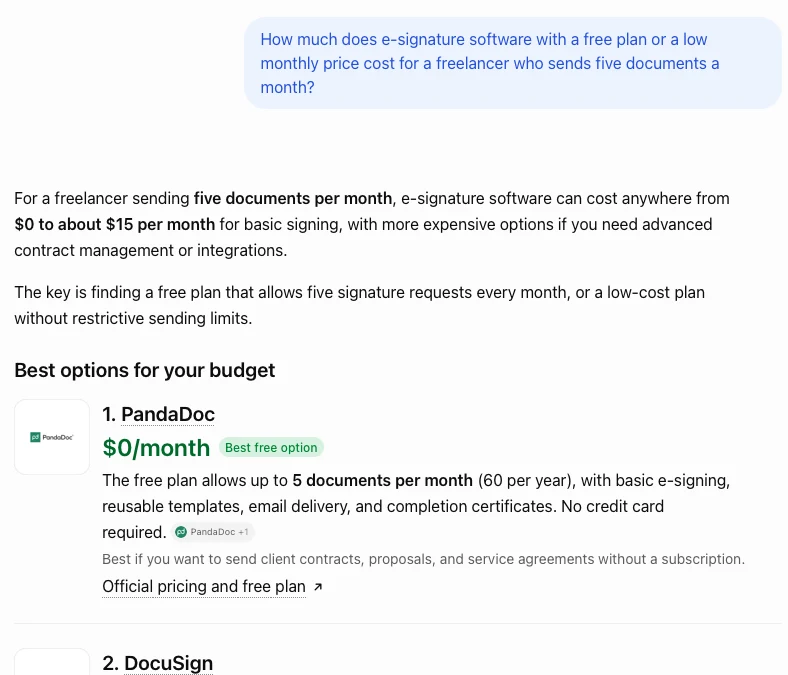
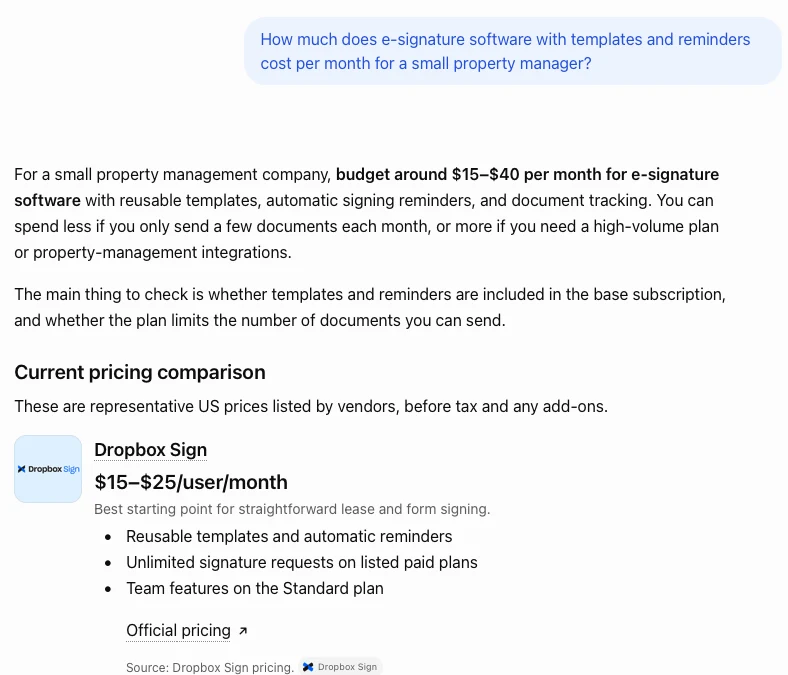
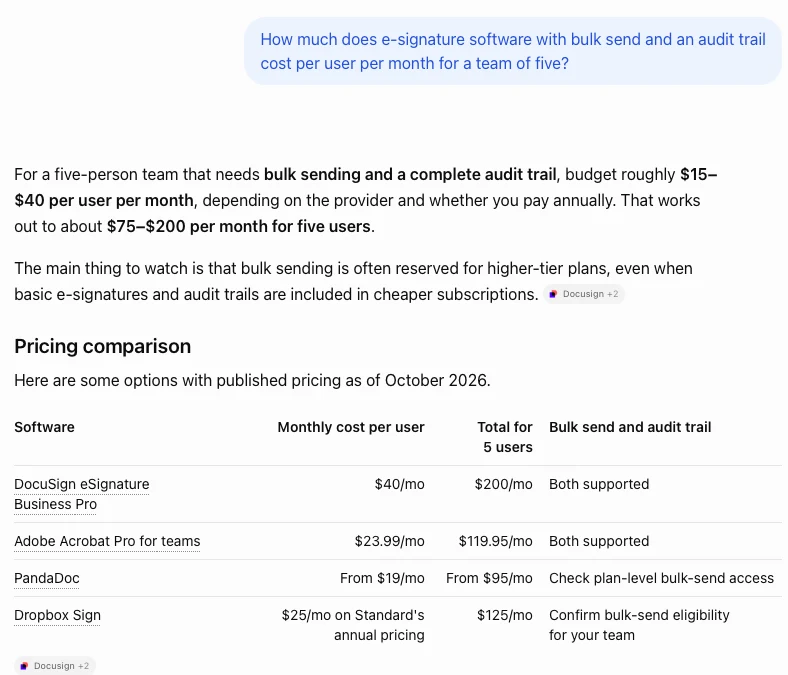
Real screenshots, cropped to the question and answer, nothing drawn on them. One run, one day.
ChatGPT linked the vendors' own sites in nearly every answer: sign.dropbox.com six times, and signwell.com, pandadoc.com, docusign.com and signnow.com four times each, docuseal.com three. Google's reference lists leaned on signeasy.com five times, pandadoc.com four and docusign.com four, with boldsign.com, esign.ai and sign.dropbox.com three each. Neither engine named G2 or Capterra.
So the AI reads what the tool says about itself first. A listing alone is not enough, and neither is a site with one features page.
The AI reads your own pricing and help pages. We write the pages that answer the exact question.
ChatGPT linked vendor pricing and feature pages in nearly every answer. A page that fits the question gets used.
Some references were not vendor pages. We do not write or buy placements. We make sure your details match.
Google also cited small sites such as esign.ai and myquoteiq.com. We do not post for you. We write pages that answer the same questions clearly.
Help pages were cited too, such as Dropbox's. Clear, current help pages get quoted.
You do not write or approve anything. Our AI agent, Ollie, does the research and the writing, our team checks it, and it goes live on your site.
You write nothing. We find the questions, write and publish the pages, then check every month.
We read your Search Console, your plans and pricing, your competitors' pages and what buyers ask, and list the questions where you should be named.
We ask ChatGPT and Google AI those questions and save dated screenshots of who gets named, and what price they print for you.
One page per question: the fit, the price, the limits. Real facts about your product, never filler.
Each page goes live with its FAQ and links to your related pages, then we load it to confirm.
We re-run the same questions and show you who is named now, next to last month.
Your product name, plans and prices made consistent so the AI reads one product, and prints one price.
Here is the shape of a pricing page we would write for a signing tool. The details change for every question, but the parts do not.
The title is the question. Written the way a buyer would type it. Not "Pricing" but "What E-Signature Software Costs for a Team of Five: Seats, Caps and What Is Extra"
The answer comes first. The price, who it fits and what you give up, in two or three sentences, so the AI has a clean line to quote.
Then the proof. Facts a reader can check: plans, limits, fees, payment rates, and a real customer if they agree.
Then the questions that come next. A real FAQ: which plan has bulk send, what counts as an envelope, what does a sixth seat cost.
Then the paths. Links to the next page the buyer needs: the comparison, the switching guide, the help page.
You have probably been burned by marketing that takes a quarter to show anything. So here is the first week, and what you can see each day. You do not write or approve anything along the way.
Google usually takes a few weeks to show new pages, so the first week is about getting the right pages live and your starting answers saved. The monthly re-check is where you see whether the AI's answer has moved.
Keep it. It is the foundation. The AI answer is built from pricing, comparison, alternatives and shop-type pages that answer one exact question. We write those and check each month who the AI names.
In our check DocuSign was named in 10 of 18 answers. Dropbox Sign and PandaDoc were named in 11 each, SignWell in 8 and airSlate SignNow in 7, and BoldSign, DocuSeal and Zoho Sign were named too, each with a price or a limit from its own page.
The AI cares whether a page answers the question and whether others vouch for you. A clear pricing page and three honest comparisons are a start.
Neither do we. Comparison pages use public facts only: plans, limits, fees. If we cannot source it, it stays out.
Many now do, before they open a pricing page. We check your category first and tell you plainly if the AI is not where your buyers look.
We cannot promise signups. The 90 day guarantee covers how often Google shows your site, and you keep every page either way.
Each page starts with its own check of what AI says in that field.
Most e-signature software companies already pay for something. Here is what each one does about AI answers, in plain terms.
| Option | What It Does | AI Answers |
|---|---|---|
| Review sites (G2, Capterra) | Collect reviews and sell placement on their pages | Neither was named in our 18 answers |
| Paid search and social | Pays for a slot beside the results | An ad beside the answer, not in it |
| A content and SEO team | Blog posts, rankings, reports | Helps, often not built for the AI's exact question |
| A GEO or AEO audit | A report on where you stand | A report, not pages |
| RunOctopus | Writes, publishes and checks a page per buyer question, every week | Checked monthly, screenshots shown |
Many now ask ChatGPT or Google's AI which signing tool fits their business and what it costs. In our check of 18 answers, 17 put a price or a free plan on the tools they named.
DocuSign was named in 10 of 18 answers, Dropbox Sign and PandaDoc in 11 each, SignWell in 8 and airSlate SignNow in 7. BoldSign, DocuSeal, Zoho Sign and others were named too. A clear page for the exact question is how a smaller tool gets named.
Yes, and it is the point. ChatGPT put Adobe Acrobat Sign for teams at $23.99 a user and Google AI put it at $35. ChatGPT called PandaDoc free for five documents while Google AI said $8 to $19. A page that states every tier name, price and cap, with a date, keeps the AI from guessing.
They matter to buyers. In our 18 answers the AI named neither. It leaned on the tools' own pricing and help pages. We do not buy placements on review sites or write reviews.
We write honest comparison and alternatives pages from public facts: plans, caps, seat and bulk send rules. We do not run anyone down and we never invent a claim. If we cannot source it, it stays out.
Yes. The AI picks tools by fit. A signing tool for property managers can answer lease templates and reminders. We write a page set per kind of buyer.
Free plans were named in every kind of answer, with their caps. A page that states how many documents the free plan allows is a page the AI can quote.
No. We research the questions, write the pages, publish them and check them live. You can read everything, but nothing waits on you.
We cannot promise signups, because AI answers change week to week. We put the right pages on your site, check each month who the AI names and show you dated screenshots, and refund you if your Google appearances are not up after 90 days.
Many sell an audit and a monthly report. We write and publish the pages and re-check every month. Ask any provider to show you what it actually shipped and the dated answers before and after.
Access to your website or CMS and Search Console, your plans and pricing, the kinds of buyers you serve, and anything that makes you different. We look up the rest ourselves.
One honest note: we have not yet worked with a e-signature software company, so the proof on this page is the check of 18 answers, not a client result. On a Florida recruiting site we do work on, a typical page earns well under one click a month at first, and half of all clicks came from 20 pages. The work is to build the pages that answer real questions well, and to check each month which ones the AI now trusts.
The pieces behind this page, in plain words.
The wider check, with a price picker for invoicing, booking and help desk.
What AI Search Visibility MeansThe idea behind being named in an answer.
Get Your Business on ChatGPTWhat to put on your site so ChatGPT can name you.
RunOctopus Compared with an SEO AgencySide by side, in plain terms.
A Case Study, Misses IncludedA recruiting site we write for, with every number and every miss.
RunOctopus for Home ServicesThe same check for the trades, with its own numbers.

We research the questions, write and publish the pages, check every one, and show you each month who the AI named. If your Google numbers are not up at 90 days, you get your money back and keep every page.
Click Here to Start with the Free Scan →How the 90-day promise works: we compare how often your site is shown in Google in the 90 days after your first page goes live against the 90 days before. It covers how often Google shows your site, not a particular ranking or a spot in a particular AI answer, because nobody can promise those. The price you start at is the price you keep, even when it goes up for new customers.
Type your website. The free scan shows what AI can and can't read, and which pages you're missing.
Run My Free Scan